


Smart switches are genuinely handy: lights you can run from your phone, set on a schedule, or kill with your voice from bed. But before you buy a handful, one wiring detail decides whether fitting them is a five-minute swap or a real project, and it catches a lot of people out. It is the neutral wire. Here are the basics worth knowing first.
Why a smart switch needs constant power
A normal switch just breaks the circuit: flip it off and the power to the light stops completely. A smart switch cannot work that way, because it has to stay powered even when the light is off, so it can keep listening for your phone, hold its schedule, and stay connected to your Wi-Fi or hub. To do that it needs a small, constant trickle of power, and that comes from the neutral wire, the conductor that carries current back to complete the circuit. You can read more about connected homes on the Wikipedia home automation page.
So most smart switches need a neutral wire present in the switch box. That is the catch, because not every switch box has one.
Do you have a neutral wire?
Whether you do comes down largely to the home’s age. Homes wired or rewired more recently, roughly from the 1990s on, usually have a neutral run to the switch boxes. Older homes often do not, because the switch was wired with only the live conductors and no neutral, which was normal practice at the time.
The way to check is to turn the circuit off at the breaker, remove the switch plate, and look for a bundle of white wires tucked into the back of the box, separate from the ones on the switch. That bundle is the neutral. Because this means opening up a live box, it is genuinely electrician territory, and it is the same connection we talk about in other wiring articles. The wiring inside a box should be sound before you start adding anything to it.
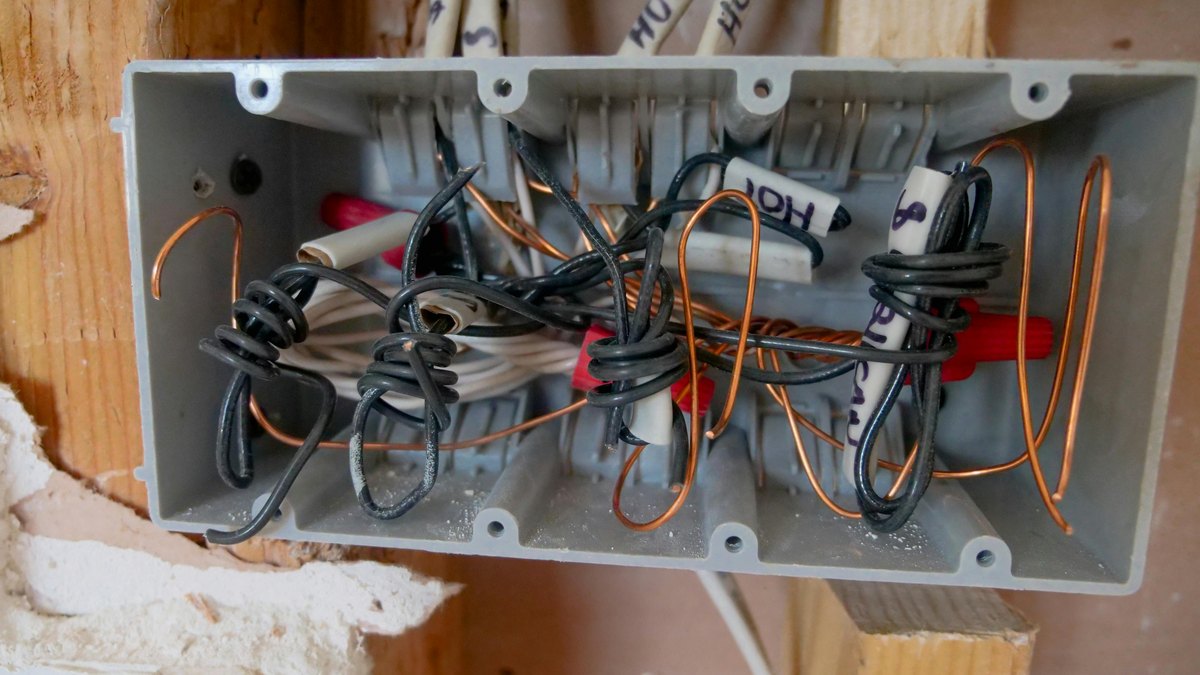
What to do if you do not have a neutral
If the box has no neutral, you still have good options.
The first is a no-neutral smart switch. These are designed to work without a neutral, often by passing a tiny current through the bulb itself. They usually need a hub to work, and they can sometimes cause LED bulbs to flicker or glow faintly, so they pair best with compatible bulbs.
The second, and often the easiest, is to skip the switch entirely and use smart bulbs. A smart bulb puts the intelligence in the bulb, so you change nothing in the wall, just screw it in and set it up. The one rule is that the wall switch has to stay on for the bulb to work, which takes a little getting used to.
The third is to have an electrician run a neutral wire to the box. It is the cleanest long-term answer if you want proper smart switches throughout, though it means opening the wall to pull in the new conductor, so it is real wiring installation work rather than a quick swap.
How they connect: Wi-Fi, hub, and Matter
Smart devices talk to your home in a few ways, and it is worth knowing the difference. Wi-Fi devices connect straight to your router with no extra box needed, which is simple to start with, but a lot of them lean on the internet and the maker’s cloud, and many on one network can crowd it. Zigbee and Z-Wave devices use their own low-power mesh and need a small hub or bridge, but they tend to be more reliable, respond faster, and keep working locally. Matter is a newer standard meant to let devices from different brands work together more easily. The short version: Wi-Fi is the easy entry, while a hub-based system is usually steadier once you have more than a few devices.
A few more wiring basics
Three quick things. Smart switches are bulkier than plain ones, so an old, shallow, or already-crowded box may not have room, which an electrician will spot. A switch that controls a light from two places, a 3-way, needs a matched smart switch and companion, not just any single unit. And a ground connection should be present and used, as with any modern switch. If you want the lowest-effort start, a smart plug needs no wiring at all and turns a lamp or appliance smart on its own.
What matters here
A couple of points land harder here. Many older homes simply have no neutral at the switch, so smart bulbs, a no-neutral switch, or running a neutral will be the realistic path more often than not. And since our power and internet both come and go, lean toward gear that keeps working locally. Wi-Fi-only devices drop offline in an outage and have to reconnect, and anything that leans entirely on the internet is dead weight during a cut, while a hub-based or Matter setup with local control keeps responding. Our surges are rough on cheap electronics too, so buy quality, choose 120-volt gear made for our supply, and protect the circuits, the same case we make in protecting electronics from JPS voltage swings.
Safety, and the takeaway
Fitting a smart switch means working on live wiring inside the wall box, so switch off the breaker and, if you are not confident, have an electrician do it. Smart bulbs and smart plugs, on the other hand, are safe plug-and-play. The takeaway: most smart switches need a neutral wire, which newer homes have and older ones often do not, so check first. If you have no neutral, use smart bulbs, a no-neutral switch with a hub, or have a neutral run in. Pick your connection type with our flaky power and internet in mind, buy quality 120-volt gear, and protect it. Get those basics right and a smart home is a pleasure rather than a headache.
Related reading
- Dimmer switches: what works with LED for the other switch upgrade people make.
- Motion sensors, timers and photocells explained for non-smart ways to automate lights.
- Protecting electronics from JPS voltage swings for keeping smart devices safe from surges.
- Wiring installations to run a neutral or fit smart switches properly.
Do smart switches need a neutral wire?
Most do. A smart switch has to stay powered even when the light is off so it can stay connected and hold its schedule, and it draws that constant trickle of power from the neutral wire. Some no-neutral models exist, but the majority need a neutral present in the switch box.
How do I know if my switch box has a neutral wire?
Turn the circuit off at the breaker, remove the switch plate, and look for a bundle of white wires tucked into the back of the box, separate from those on the switch. That bundle is the neutral. Because it means opening a live box, it is safest to have an electrician check.
What can I do if I do not have a neutral wire?
Three options: use a no-neutral smart switch, which usually needs a hub and can flicker some LEDs; use smart bulbs, which need no rewiring but require the wall switch to stay on; or have an electrician run a neutral wire to the box, which is the cleanest long-term fix.
What is the difference between Wi-Fi and hub-based smart switches?
Wi-Fi devices connect straight to your router with no hub, which is simple but often relies on the internet and can crowd the network. Zigbee or Z-Wave devices use a low-power mesh and need a hub, but are usually more reliable and keep working locally. Matter is a newer standard for cross-brand compatibility.
Are smart switches a good idea with our power and internet?
They can be, if you choose well. Wi-Fi-only devices drop offline in an outage and rely on the internet, so a hub-based or Matter system with local control is steadier here. Buy quality 120-volt gear made for our supply and protect the circuits against surges.
Can I install a smart switch myself?
A smart switch involves live wiring inside the wall box, so switch off the breaker and, if you are not confident, have an electrician fit it, especially since older boxes may lack a neutral or the space. Smart bulbs and smart plugs, by contrast, are safe plug-and-play with no wiring.
The next step
Thinking about smart switches but not sure your wiring is ready? Get a free quote or message us, and we will check for a neutral, sort out the wiring, and fit smart controls that work with our power.